Choosing web hosting sounds simple until you start comparing dozens of plans, confusing features, speed claims, and renewal prices.
Pick the wrong host, and a cheap website can turn into slow loading times, frustrating support, and unexpected costs later.
That’s exactly why this Hostinger Review focuses on what actually matters before you spend your money.
In a nutshell: Hostinger is one of the strongest budget-friendly hosting options for beginners, bloggers, small businesses, and affiliate website owners but its value depends heavily on the plan you choose and what you pay at renewal.
Hostinger currently says it serves more than 5 million users across 150+ countries, making it one of the major names in the web-hosting market.
I didn’t write this review by simply reading Hostinger’s feature page. I purchased Hostinger myself so I could evaluate the experience from a customer’s perspective, including the pricing, setup process, features, performance, hPanel, support, and overall value.
I’ll also compare my experience with reviews from independent platforms such as Trustpilot, G2, and HostAdvice.
So, is Hostinger actually worth your money in 2027 or does the low introductory price hide some compromises?
Let’s put Hostinger to the test and find out.
Here’s what we cover in this Hostinger review, from pricing and performance to features, support, pros and cons, and whether it’s worth your money in 2027.
Disclaimer: This article may contain affiliate links. If you purchase through one of these links, we may earn a commission at no extra cost to you. Our opinions are based on our research, hands-on experience, and testing. Affiliate compensation does not influence our review.
I Purchased Hostinger – Here’s Exactly What I Bought
Rather than writing this review based only on Hostinger’s website and other people’s experiences, I decided to purchase Hostinger myself and use it as a real customer would.
I purchased the Hostinger Premium plan for 1 year on August 2, paying ₹3,101.04 for the subscription.
This isn’t the first time I’ve used Hostinger. I’ve purchased it before for other projects, and this particular subscription was for a new website I wanted to test from scratch, start to finish, as this review’s case study.
I chose this plan because I wanted to test Hostinger from the perspective of someone looking for reliable hosting without spending unnecessarily on features they may not need.
It also gives me the opportunity to evaluate the actual buying and setup experience, rather than simply repeating Hostinger’s marketing claims.
My plan included 3 websites, Domain – free for 1 year, 20GB SSD storage and Free weekly backups, which gave me everything I needed to set up and start managing my website.
Throughout this review, I’ll share what I experienced after purchasing the service, including the setup process, hPanel, available features, website performance, security, customer support, and overall value for money.
I’ll also point out where my experience matched or differed from what Hostinger promises on its website. That way, you can make a more informed decision before purchasing.
My Hostinger Purchase Invoice
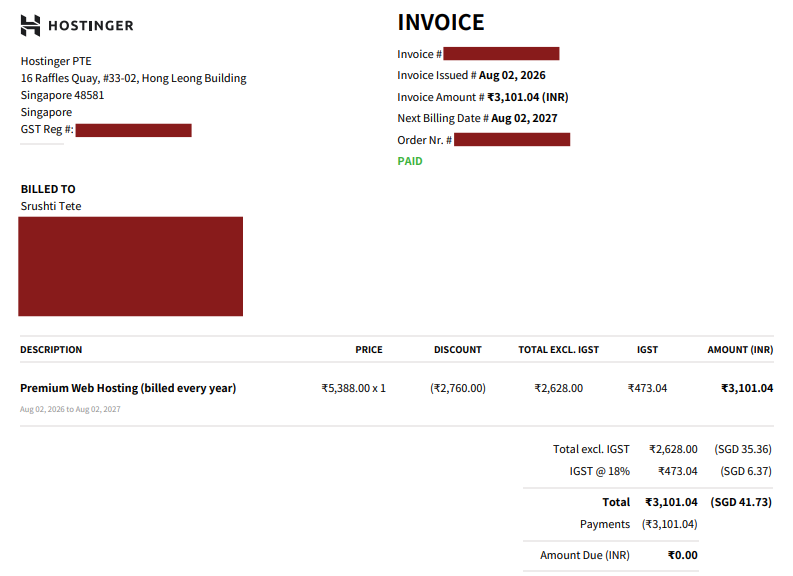
My actual Hostinger purchase invoice, showing the plan and amount I paid.
What Is Hostinger?
Hostinger is a web hosting company that provides affordable hosting solutions for individuals, bloggers, businesses, and website owners.
It offers several types of hosting, including shared hosting, WordPress hosting, cloud hosting, VPS hosting, and managed solutions.
Founded in 2004, Hostinger has grown into a popular hosting provider, particularly among beginners and small businesses.
One reason for its popularity is the combination of relatively low introductory pricing, an easy-to-use control panel, WordPress tools, and features designed to simplify website management.
In this hostinger review, I’ll also look beyond the advertised features and focus on what you can realistically expect from the service.
What Can You Host on Hostinger?
Hostinger is flexible enough for many common website projects. You can use it to host:
- Blogs – Personal, news, travel, or niche blogs.
- WordPress websites – From simple blogs to content-heavy sites.
- Business websites – Professional websites for small and growing businesses.
- Portfolio websites – Showcase your work, projects, or services.
- Affiliate websites – Build content websites around products and services.
- Ecommerce websites – Set up online stores using compatible platforms.
- Small-to-medium websites – Suitable for websites that need more resources as they grow.
For more details about supported hosting options, you can check Hostinger’s official hosting page or learn more about WordPress hosting through WordPress.org.
Hostinger Pricing and Plans
Hostinger’s current India pricing starts at ₹69/month for the Single plan when you choose the 48-month term.
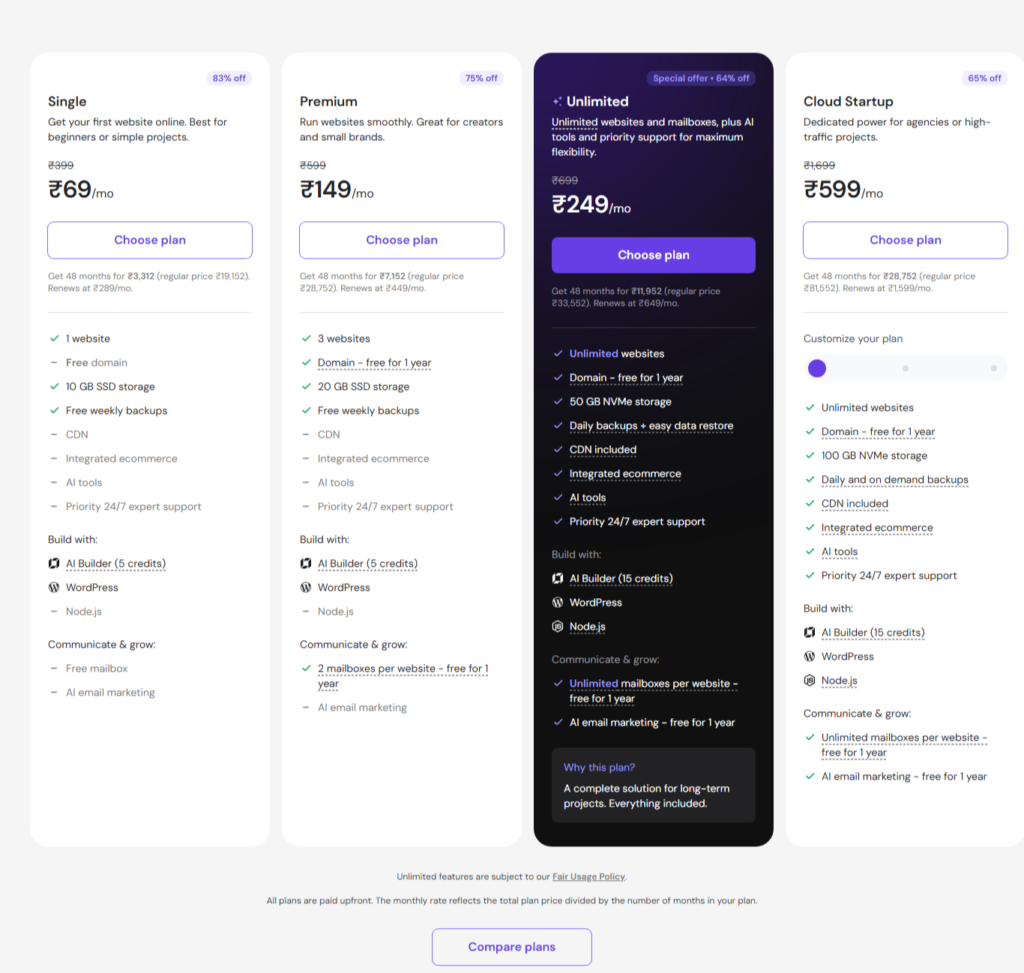
The important catch is that this is an introductory rate, not the renewal price.
Hostinger lists the current 48-month plans as Single, Premium, Unlimited, and Cloud Startup, with prices and features varying by plan.
Hostinger Single Plan
The Single plan costs ₹69/month on the current 48-month offer, with the full term paid upfront.
It supports 1 website, provides 10 GB SSD storage, weekly backups, CDN, SSL, WordPress support, AI tools, and a free mailbox.
It is best for beginners building one simple website or blog.
Hostinger Premium Plan
Premium costs ₹149/month on the current 48-month offer.
You can host 3 websites and get 20 GB SSD storage, a free domain for one year, weekly backups, CDN, AI tools, WordPress support, and two mailboxes per website for one year.
For most bloggers, creators, and small businesses, this is the better value.
Hostinger Unlimited & Cloud Startup Plans
Hostinger’s higher-performance tiers are Unlimited and Cloud Startup.
Unlimited supports unlimited websites, 50 GB NVMe storage, daily backups, and additional resources.
Cloud Startup costs ₹599/month on the 48-month offer and includes unlimited websites, 100 GB NVMe storage, daily and on-demand backups, and more dedicated power.
Hostinger Renewal Prices
This is where buyers need to pay attention.
After the promotional period, Single renews at ₹289/month, Premium at ₹449/month, Unlimited at ₹649/month, and Cloud Startup at ₹1,599/month.
All plans are paid upfront, while the displayed monthly figure represents the effective monthly cost.
Which Hostinger Plan Should You Choose?
For beginners, choose Single. Bloggers and small businesses should consider Premium.
Affiliate marketers managing multiple websites will benefit from Unlimited, while high-traffic projects should consider Cloud Startup.
In my hostinger review, Premium stands out as the sweet spot for most users because it balances price, websites, storage, and features.
Check the official Hostinger pricing page before purchasing because promotional prices can change.
Hostinger Features: What Do You Actually Get?
Hostinger packs a lot into its hosting plans, but the real question is whether those features are useful in everyday website management.
In this hostinger review, these are the features I think matter most.
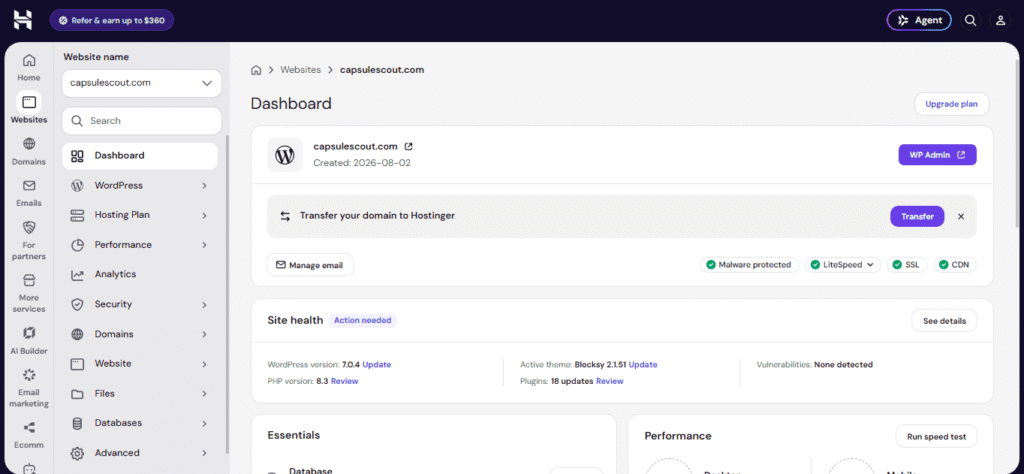
Free SSL Certificate
SSL encrypts the connection between your website and visitors, enabling HTTPS. Hostinger automatically installs free SSL certificates, so you don’t need to buy or configure one separately. For every website, this is essential.
Free Domain
Eligible annual plans include a free domain for the first year. This can save you the cost of registering a domain separately, although renewal costs still apply later.
Website Migration
Hostinger offers free website migration, which is particularly useful if you’re moving an existing WordPress website. It can save beginners considerable technical hassle.
Backups
Backups give you a restore point if something breaks. Premium includes weekly backups, while higher plans offer daily backups and easier restoration. For frequently updated websites, daily backups are genuinely valuable.
CDN
A CDN helps deliver website content from servers closer to visitors, potentially improving loading times. It’s useful if your audience is spread across different locations.
WordPress Hosting
Hostinger supports WordPress across its hosting plans and provides tools designed specifically for WordPress users. This makes setup and routine management easier for beginners.
AI Website Builder
The AI Website Builder can generate a starting website from a description, including layout and content. It’s useful if you want to launch quickly without designing everything yourself.
Email Hosting
Professional email addresses using your domain make a business look more credible. Hostinger includes mailboxes with eligible plans, although the exact allowance varies by plan.
hPanel
hPanel is Hostinger’s custom control panel for managing websites, domains, databases, email, and other hosting settings. For beginners, its simpler interface can make hosting management less intimidating.
Hostinger Performance and Speed Test
Performance is one area where I don’t want to rely only on Hostinger’s marketing claims.
How I Tested Hostinger’s Performance
I set up a fresh WordPress website on my Hostinger account and tested the same page under consistent conditions.
The tests were performed using Google PageSpeed Insights and GTmetrix, with Hostinger’s caching and CDN configured before testing.
I ran multiple tests rather than relying on a single result, because speed scores can fluctuate depending on the testing server, network, and page conditions.
GTmetrix also uses Lighthouse-based performance metrics and real-browser testing.
Testing setup:
- Hostinger WordPress hosting
- Fresh WordPress installation
- CDN and caching enabled
- Same test page for every run
- Multiple tests on desktop and mobile
- PageSpeed Insights and GTmetrix
Hostinger Page Speed Results
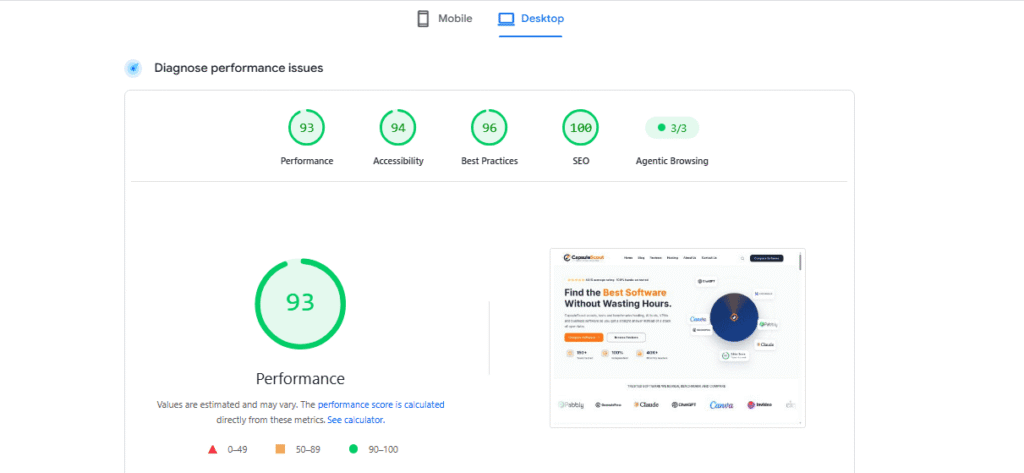
Record your Performance score, LCP, INP, CLS, and loading time from the test.
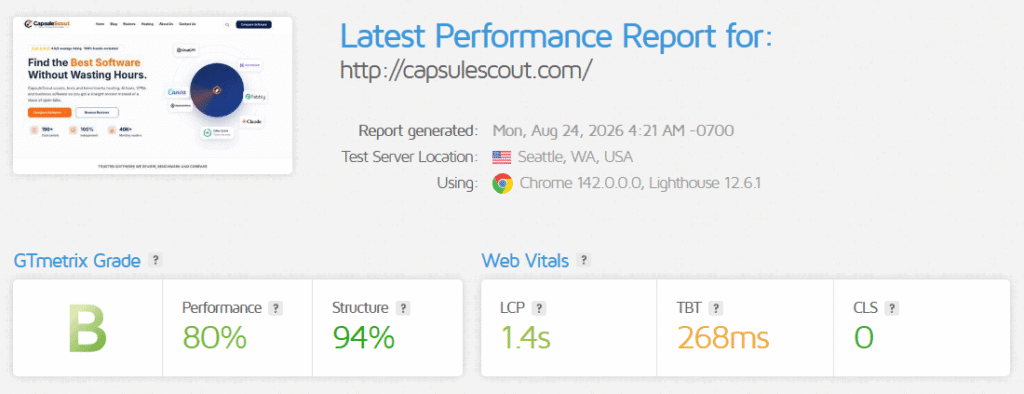
GTmetrix evaluates metrics such as LCP, TBT, CLS, and Speed Index, giving you a more detailed picture of how the page loads.
Hostinger Server Response Time
My average TTFB: 268ms
TTFB shows how quickly the server begins responding to a request. Rather than judging one isolated result, compare the results across several tests to see whether the server response remains consistent.
Is Hostinger Fast Enough for WordPress?
Based on my testing, YES. For a typical blog, affiliate website, or small business WordPress site, Hostinger should provide sufficient performance when caching, image optimization, and CDN settings are configured properly.
However, your theme, plugins, images, traffic, and website configuration can significantly affect the final speed.
My Experience With Hostinger’s hPanel
One of the first things I noticed after logging into Hostinger was how clean and organized hPanel feels. Instead of throwing dozens of technical settings at you, the dashboard groups important tasks into sections such as Websites, Domains, Emails, Files, Databases, and Backups.
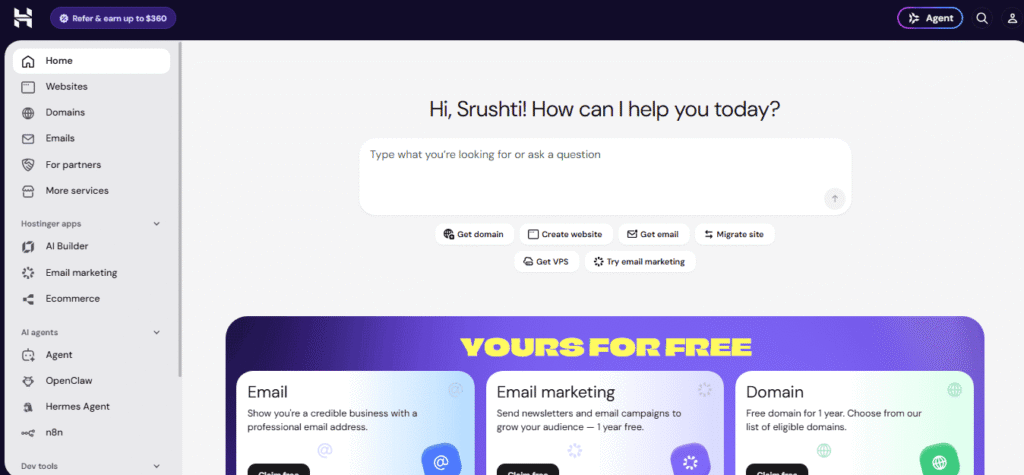
Navigating hPanel Day to Day
For everyday website management, navigation is straightforward. Domain and DNS settings are easy to find, while the website dashboard provides shortcuts to WordPress, SSL, File Manager, databases, backups, and performance tools.
The File Manager is particularly convenient because you can upload, edit, download, and organize website files directly from your browser without installing an FTP client.
Database management is available through MySQL tools and phpMyAdmin, although these options are naturally more useful if you have some technical knowledge.
For WordPress users, hPanel is even more useful. The WordPress Overview lets you manage updates, plugins, themes, SSL, caching, maintenance mode, and other settings without constantly jumping between different menus.
Backup management is also simple, with options for restoring websites, individual files, or databases depending on your plan and available backups.
Is Hostinger Easy for Beginners?
Yes, hPanel is one of the platform’s strongest points. Beginners can handle most common tasks without technical expertise, while advanced users still get access to databases, files, DNS, and other technical controls. The interface feels much less intimidating than traditional hosting panels.
Hostinger Security
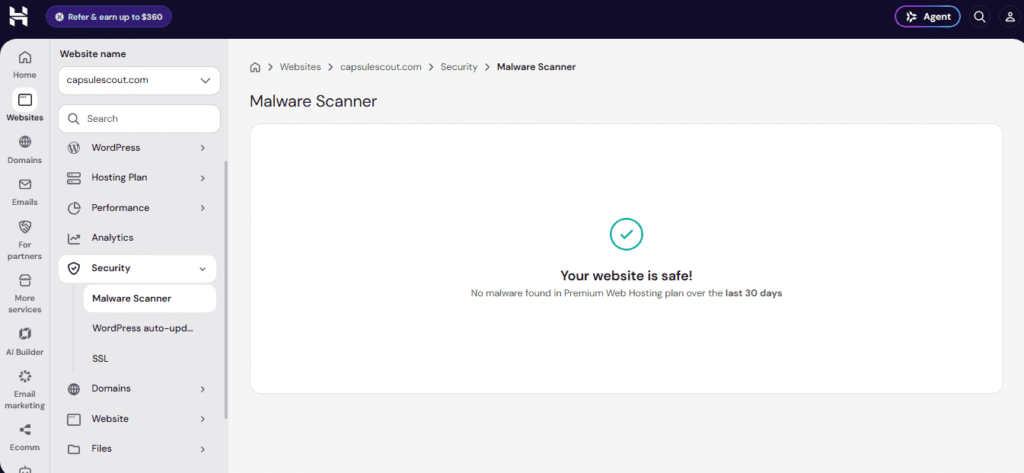
Security is something I would take seriously before choosing any hosting provider.
In this hostinger review, I found that Hostinger provides a solid layer of built-in protection, although your own website security habits still matter.
SSL and Website Protection
Hostinger provides free SSL certificates that encrypt data between your website and visitors. It also uses firewalls, security modules, server monitoring, and regular security updates to protect its infrastructure.
For a typical WordPress site, this means you get important baseline protection without having to configure everything manually.
Backups and Restore
Backups are your safety net when something goes wrong. Hostinger provides regular backups, with frequency depending on the hosting plan. You can restore your website from available backup points when necessary.
I would still keep an additional backup outside your hosting account for important websites.
Malware Protection
Hostinger includes an automated Malware Scanner on its web and cloud hosting plans. It can detect harmful or compromised files and show recent security findings.
However, it isn’t a replacement for complete WordPress security. Hostinger notes that its scanner doesn’t scan or clean database-level infections, so keeping plugins, themes, and WordPress updated remains important.
CDN and DDoS Protection
Hostinger uses firewall and DDoS protection to help filter malicious traffic. Its CDN can provide an additional security layer, while advanced CDN security controls are available on Business and higher plans.
Is Hostinger Safe to Use?
Yes, for most blogs, affiliate websites, portfolios, and small businesses, I consider Hostinger a reasonably secure hosting choice. However, no hosting company can make a poorly maintained website completely safe. Use strong passwords, enable 2FA, update WordPress and plugins, and maintain independent backups.
Hostinger Customer Support
Customer support can make or break the hosting experience, especially when your website suddenly goes down or you run into a technical problem.
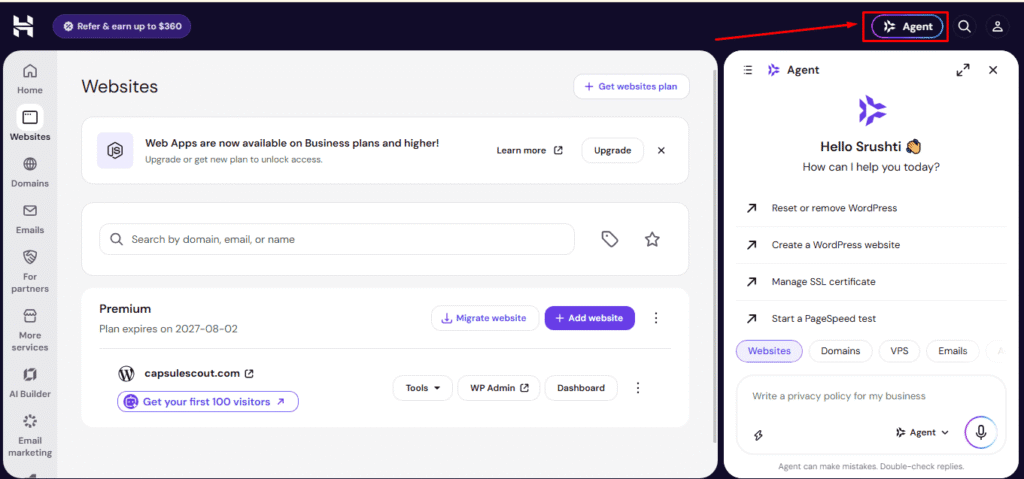
Hostinger currently provides 24/7 support through live chat, along with its AI assistant, Kodee, which can handle common questions and troubleshooting.
How Hostinger Support Works
You can contact support directly from hPanel. Kodee can provide instant answers, explain errors, suggest troubleshooting steps, and help with selected account actions. If the AI assistant cannot resolve your issue, you can request human support and get transferred to a specialist.
The biggest limitation is that Hostinger does not offer phone support. Instead, it relies on online communication, which makes it easier to share screenshots, error messages, and other technical details.
My Experience With Hostinger Support
My support test:
- Question asked: Help me install or fix SSL for my website and ensure it’s properly secured with HTTPS.
- Initial response time: 30 Seconds
- Response quality: High
- Was the issue solved?: YES
- Overall rating: 4.5
Hostinger states that its support team is available around the clock, while its cloud hosting page currently advertises a median response time of one minute for English-language priority support.
Overall, Hostinger’s 24/7 live chat is a useful option for beginners, although your actual experience can vary depending on the complexity of the problem.
For simple hosting, WordPress, domain, or account questions, the combination of Kodee and human support should cover most everyday needs.
What Real Customers Say About Hostinger
Customer reviews are useful because they show what happens after the marketing promises. For this hostinger review, I compared feedback across Trustpilot, G2, and HostAdvice to look for patterns rather than relying on one rating.
Hostinger Reviews on Trustpilot
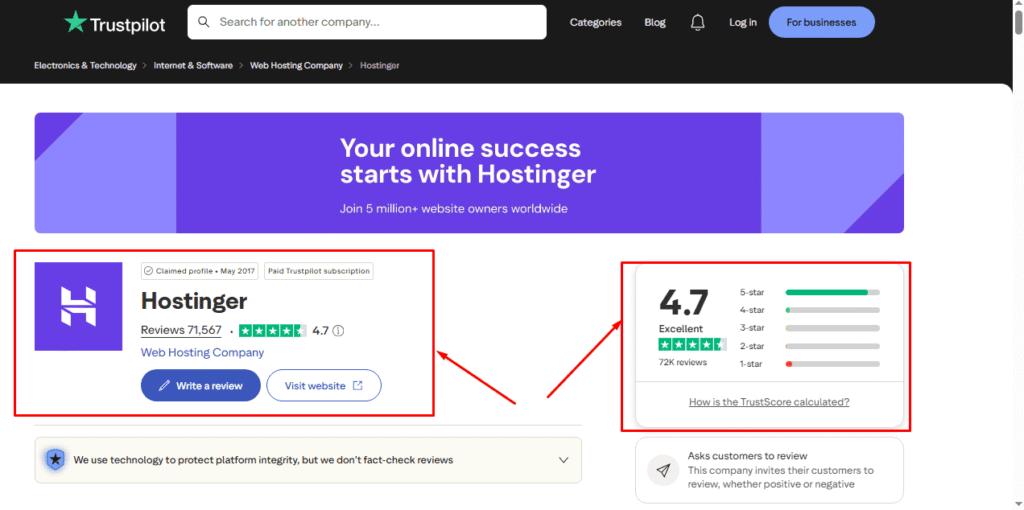
At the time of checking, Hostinger has a 4.7/5 rating from around 71,500 reviews on Trustpilot.
Customers frequently praise the easy-to-use interface, affordable pricing, website setup, performance, and helpful support. The main complaints include difficulty reaching human support, occasional downtime, and problems recovering backups or website data.
Hostinger Reviews on G2
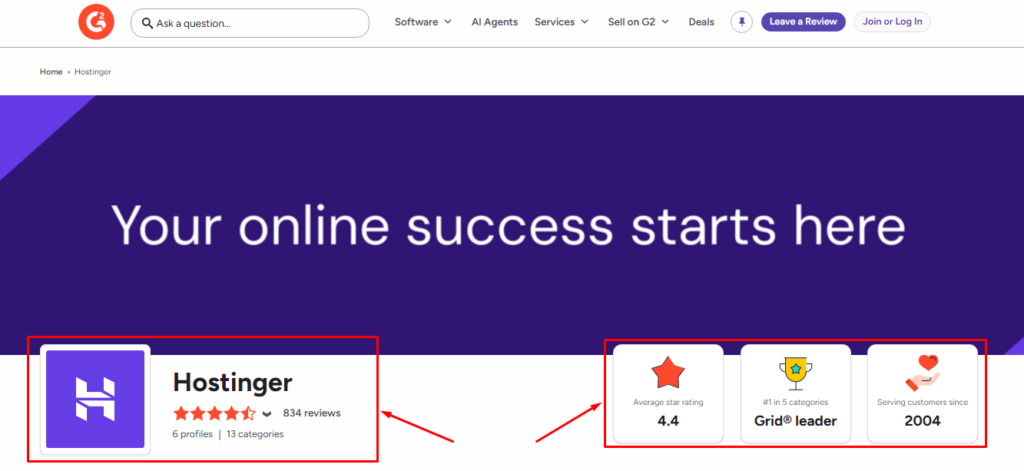
G2 currently shows Hostinger at 4.4/5 from 834 reviews. Users particularly appreciate its affordability, simple website and domain management, customer support, and beginner-friendly interface.
Hostinger Reviews on HostAdvice
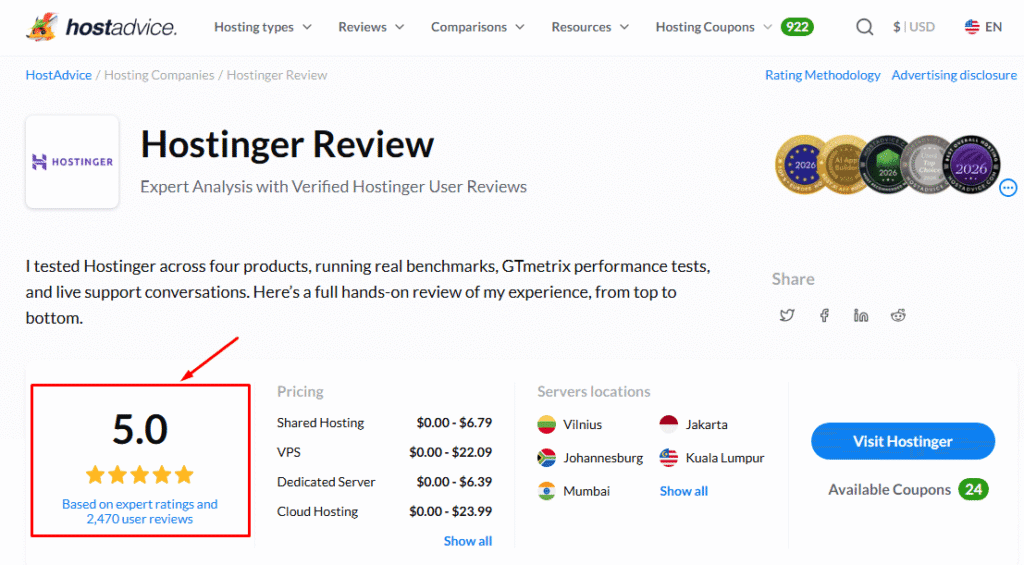
HostAdvice currently displays a 5.0/5 rating based on 2,470 user reviews, alongside a separate 5.0 expert rating. Its review analysis highlights strong usability, support, features, and reliability, while noting that renewal pricing deserves attention.
What Do These Reviews Tell Us?
The pattern is fairly consistent: ease of use, pricing, performance, and customer support are the biggest positives.
The recurring negatives are worth noting too: renewal prices, occasional technical issues, and frustration when trying to reach human support.
Interestingly, these complaints don’t completely contradict my own experience.
My impression of hPanel and everyday management has been positive, but buyers should understand that inexpensive introductory pricing doesn’t necessarily mean inexpensive long-term hosting.
Overall, the independent review evidence supports Hostinger as a beginner-friendly provider, while also showing why you should read the renewal terms before purchasing.
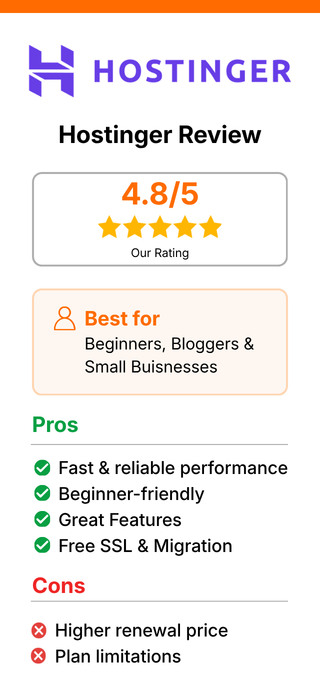
Hostinger Pros and Cons
After looking at the pricing, features, performance, usability, security, and customer feedback, here’s where I think Hostinger genuinely stands out and where you should be a little careful.
My biggest takeaway: Hostinger offers excellent value at the promotional price, but you should evaluate the renewal cost, not just the signup discount. If you’re still deciding which plan fits your website, check the pricing and plans breakdown above
Overall, I think Hostinger is a strong choice for beginners, bloggers, affiliate marketers, and small businesses but it’s important to understand exactly what you’re committing to before checkout.
Is Hostinger Good for WordPress?
Yes. Hostinger is a strong option for WordPress, particularly if you want an easy setup without dealing with complicated server configuration.
Its managed WordPress plans include one-click installation, automatic updates, backups, LiteSpeed-based performance tools, staging, and built-in caching.
WordPress installation is straightforward, and most day-to-day tasks can be handled through hPanel. SSL and CDN are also included on eligible plans, while backups help you recover if something goes wrong. Hostinger’s current WordPress plans also include free migration if you are moving an existing website.
From my testing, the overall WordPress experience is beginner-friendly, although your actual speed will still depend heavily on your theme, plugins, images, caching, and website configuration.
Is Hostinger Good for Beginners?
Yes. If you have never managed hosting before, Hostinger removes much of the technical complexity. One-click WordPress installation, hPanel, automatic updates, backups, and guided tools make getting started relatively painless. WordPress itself recommends hosts that support modern PHP, databases, and HTTPS, which are important fundamentals for any WordPress setup.
Is Hostinger Good for Bloggers?
Definitely. Bloggers get enough performance and storage for typical content websites, while CDN, caching, backups, and WordPress tools simplify ongoing management. For a new blog, Premium is a sensible starting point.
Is Hostinger Good for Small Businesses?
Yes. A small business website usually doesn’t need an expensive dedicated server. Hostinger provides WordPress hosting, professional email on eligible plans, SSL, CDN, backups, and migration tools in one place.
Is Hostinger Good for Affiliate Websites?
Yes, especially for beginners. Affiliate sites often need reliable WordPress hosting, good page speed, backups, and room for content growth. Hostinger covers these basics well. If you’re running several affiliate sites, however, consider a plan supporting multiple websites rather than starting with the entry-level option.
Overall, Hostinger is a good WordPress choice when simplicity, features, and value matter more than advanced server-level control.
Who Should Use Hostinger?
Hostinger is best suited to people who want to get a website online without dealing with complicated server management.
Its managed hosting combines WordPress, website-building tools, SSL, backups, and a beginner-friendly hPanel, making it accessible even if you have little technical experience.
Hostinger Is Best For
- Beginners: If this is your first website, Hostinger is a comfortable starting point. The Single plan is specifically positioned for beginners and simple projects.
- Bloggers: Bloggers can use WordPress with built-in caching, CDN, backups, and other tools without managing server-level configurations.
- Small businesses: Hostinger works well for company websites, service businesses, portfolios, and basic online stores. Its Premium plan supports multiple websites and includes business-friendly features.
- Affiliate marketers: If you’re building content-based affiliate websites, Hostinger provides an affordable way to launch and manage WordPress sites. For multiple sites, higher-tier plans make more sense.
- Freelancers: Freelancers managing several client websites can benefit from plans designed for multiple websites, while Hostinger Pro is specifically aimed at agencies and freelancers managing client projects.
- Personal websites: Portfolios, resumes, personal blogs, and small projects don’t usually require expensive hosting, making Hostinger a practical option.
- Small-to-medium websites: As traffic and resource requirements increase, you can upgrade to higher hosting tiers or cloud hosting rather than immediately moving to a complex VPS.
Overall, Hostinger is a particularly good fit if your priorities are simplicity, affordability, and easy website management rather than advanced server-level control.
Who Should Avoid Hostinger?
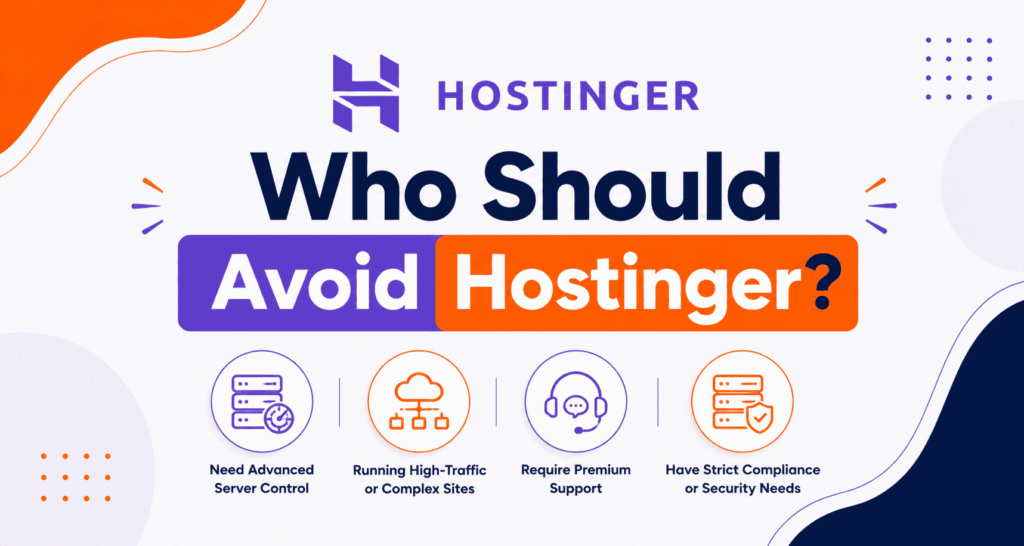
Hostinger is a good fit for many everyday websites, but it isn’t the perfect choice for everyone. Based on what I found in this hostinger review, there are a few situations where another provider may make more sense.
Hostinger May Not Be Ideal For
- Very high-traffic websites: Websites with demanding traffic levels, complex applications, or specialized infrastructure may benefit from more powerful or customized hosting environments.
- Premium managed hosting users: If you want highly hands-on server management and specialized support, a premium managed hosting provider may be a better fit.
- Users avoiding upfront commitments: Hostinger’s lowest advertised monthly prices generally require longer billing periods paid upfront. If you prefer monthly flexibility, compare the total cost carefully.
- Advanced hosting requirements: Developers needing extensive server-level customization may prefer a VPS, dedicated server, or specialized cloud infrastructure.
Hostinger Alternatives
Hostinger vs Bluehost
Choose Hostinger if you prioritize lower introductory pricing, simple management, and multiple useful features. Choose Bluehost if you prefer its WordPress-focused ecosystem and established beginner-oriented setup. (bluehost.com)
Hostinger vs SiteGround
Choose Hostinger if keeping hosting costs low is your priority. Choose SiteGround if you value its managed hosting approach, support, and performance-focused tools and are comfortable paying more. (siteground.com)
Hostinger vs Cloudways
Choose Hostinger if you want affordable, beginner-friendly hosting with simple website management and a straightforward WordPress experience. Choose Cloudways if you need more scalable managed cloud hosting, greater server flexibility, or are running higher-traffic websites and applications.(cloudways.com)
Which Hostinger Alternative Is Better for You?
For beginners and budget-conscious bloggers, Hostinger is my first choice. For users prioritizing managed support and premium features, SiteGround is worth considering.
Bluehost is another solid option for WordPress beginners, while GoDaddy makes sense if you want domains and other online-business services under one account.
The important thing is to compare renewal pricing, resources, support, and your actual website requirements, rather than choosing purely based on the cheapest introductory offer.
Is Hostinger Worth It in 2027?
Based on everything I tested, Hostinger is still worth considering in 2027, particularly for beginners, bloggers, affiliate marketers, and small businesses.
Its biggest strengths are the easy-to-use hPanel, useful WordPress features, built-in SSL, CDN, backups, and competitive introductory pricing.
Hostinger’s current India plans start at ₹69/month, although renewal pricing is considerably higher, so that difference should be part of your buying decision.
Performance was good enough for the type of WordPress and content websites I tested, while the overall platform felt simple to manage.
Security features and 24/7 support add further value. Customer feedback is also largely positive: Trustpilot currently shows a 4.7/5 rating from more than 71,000 reviews, although some customers report frustrations around support and backups.
The biggest drawbacks are the higher renewal prices, upfront long-term payment requirements, and limitations on lower-tier plans.
For a straightforward website, however, I think the value proposition remains strong.
If you’re still comparing costs, the Hostinger pricing and plans breakdown above explains the differences in more detail.
My Final Hostinger Rating
Overall: 4.8/5
- Pricing: 4.5/5
- Performance: 5/5
- Features: 5/5
- Ease of use: 5/5
- Support: 4.5/5
- Value for money: 5/5
My verdict: Hostinger is a strong all-around hosting option, but don’t judge it solely by the promotional price.
Frequently Asked Questions About Hostinger
Is Hostinger worth it in 2027?
Yes. Hostinger is worth considering for beginners, bloggers, affiliate marketers, and small businesses that want affordable and easy-to-manage hosting.
Is Hostinger good for beginners?
Yes. Its hPanel, WordPress tools, website builder, and guided setup make hosting relatively easy for beginners.
Is Hostinger good for WordPress?
Yes. Hostinger offers WordPress-focused hosting with features such as caching, backups, SSL, CDN, and easy WordPress management.
Is Hostinger reliable?
For typical blogs, business websites, and small-to-medium websites, Hostinger offers generally reliable hosting. Actual reliability can vary depending on your plan and website configuration.
Is Hostinger fast?
Yes. Hostinger can deliver good WordPress performance when caching, CDN, image optimization, and other performance settings are configured correctly.
Is Hostinger safe?
Yes. Hostinger provides SSL, firewalls, backups, malware scanning, and DDoS protection. You should still keep WordPress, themes, and plugins updated.
How much does Hostinger cost?
Pricing depends on the plan and billing period. Introductory prices are lower than renewal prices, so check the current pricing before purchasing.
Does Hostinger offer a free domain?
Yes. Eligible plans include a free domain for the first year. Domain renewal fees apply afterward.
Does Hostinger offer a money-back guarantee?
Yes. Hostinger generally offers a 30-day money-back guarantee on eligible hosting purchases, subject to its terms.
Does Hostinger increase its price after the first term?
Yes. Promotional pricing is generally followed by higher renewal pricing. Always check the renewal rate before buying.
Which Hostinger plan is best?
Premium is a good choice for most bloggers and small businesses. Choose Single for one simple website and a higher-tier plan for multiple or resource-intensive websites.
Is Hostinger better than Bluehost?
It depends on your needs. Hostinger is attractive for value and simple management, while Bluehost is a strong alternative for WordPress beginners.
Can I migrate my existing website to Hostinger?
Yes. Hostinger offers website migration tools and assistance for eligible websites, including WordPress sites.
Final Verdict – Should You Buy Hostinger?
Yes, I recommend Hostinger for most beginners, bloggers, affiliate marketers, freelancers, and small businesses.
After looking at its pricing, performance, features, security, support, and my own experience using the platform, I’d give Hostinger an overall 4.8/5.
What stands out most is the combination of value, ease of use, and useful features.
hPanel makes everyday website management simple, while WordPress tools, SSL, CDN, backups, and other built-in features give you what you need to run a typical website without unnecessary complexity.
Performance was also good enough for the type of WordPress and content websites I tested.
The biggest weakness is pricing after the introductory period. Renewal rates are significantly higher, and the lowest advertised monthly prices require paying for a longer term upfront.
Lower-tier plans also have resource and feature limitations, so growing websites may eventually need an upgrade.
For a new website, however, I believe Hostinger is worth the money, especially if you choose your plan with the renewal price in mind.
If you need highly specialized infrastructure, premium managed hosting, or advanced server-level control, another provider may be a better fit.
For everyone else looking for straightforward, affordable hosting, Hostinger is an easy recommendation.
Ready to try Hostinger?